Managed APIs Page
Managed APIs provide access to any web-connectable data. They contain details and credentials to be used when consuming data from a web resource. The primary use case for Managed APIs is using them in scripts.

Managed APIs page
The Managed APIs page displays Managed APIs view. On this page you can:
- Create a new Managed API by clicking the plus button on the top right corner of the view
- Edit a Managed API by clicking on it in the view
Managed API Editor
The editor lets you create a new or edit an existing Managed API. A Managed API has following fields:
Programmatic Name: a language-independent (programmatic) name to be used within scriptsDisplay name: a human language name for display purposesDescription: an optional descriptionImage: an image for display purposesKey Value Pairs: a list of arbitrary key - value mappings
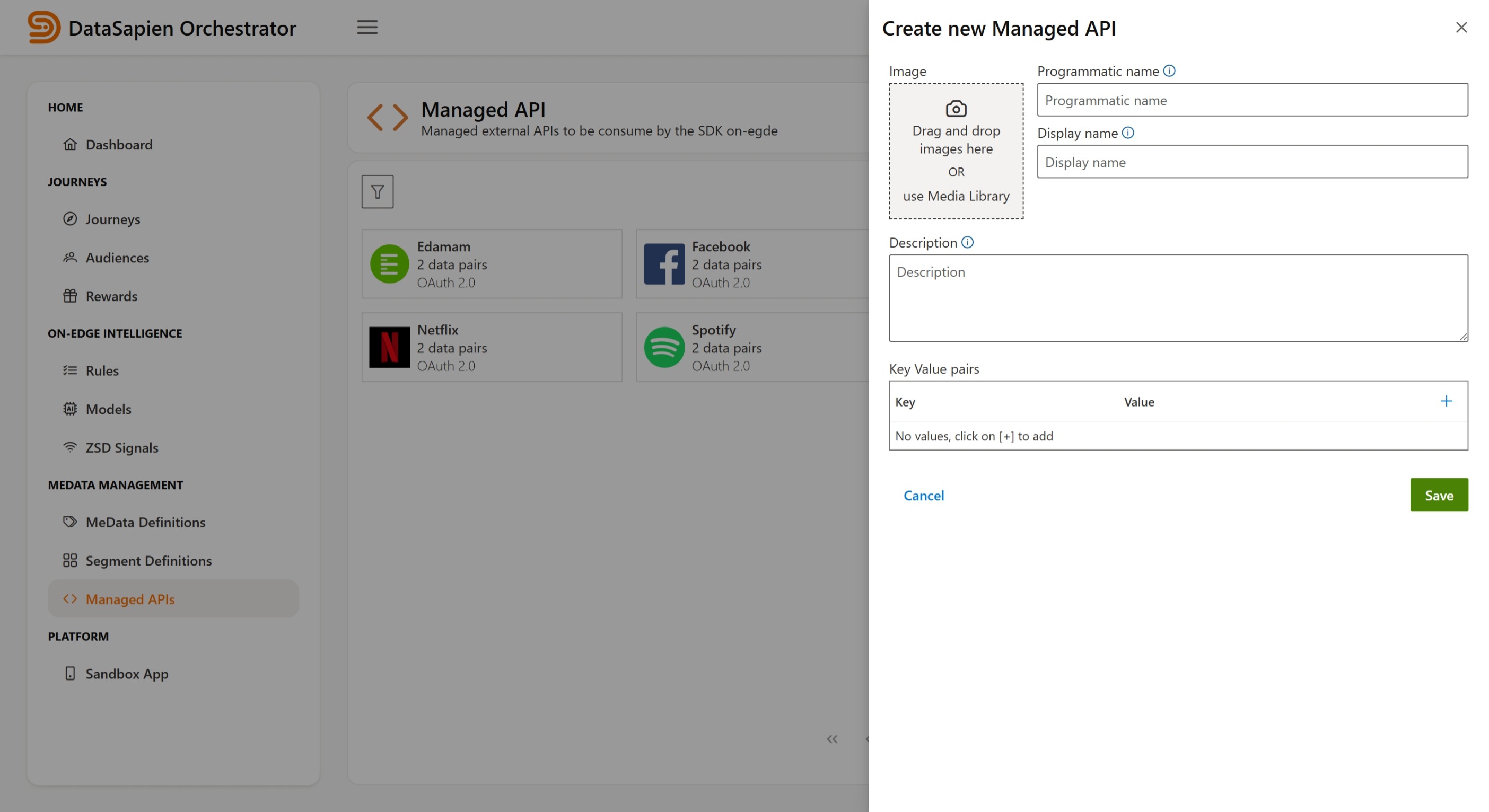
Managed API Editor
Key Value Pairs
The key value mapping is intended to store anything that is required to consume the Managed API within native code or scripts. Anything that the code may need should be stored here. Common information stored here:
- Credentials for authentication
- Base URL of the API
Secure Storage
The Mobile SDK stores Managed API key-value pairs securely on iOS KeyChain and Android KeyStore.